

chroma.db
theme visualizer + contrast checker + test code for 200 color palettes
all for squarespace 7.1
yours for $20 USD
Five colors. Ten themes. So many possibilities.
Picking a color palette shouldn't take longer than building the website.
Chroma.db gives you 200 ready-to-explore color combinations designed around Squarespace's five-color palette system.
No endless Pinterest boards. No guessing which colors look good together. No wondering what that accent color will look like on a button.
Just pick a palette and see what a default squarespace 7.1 site would look like.
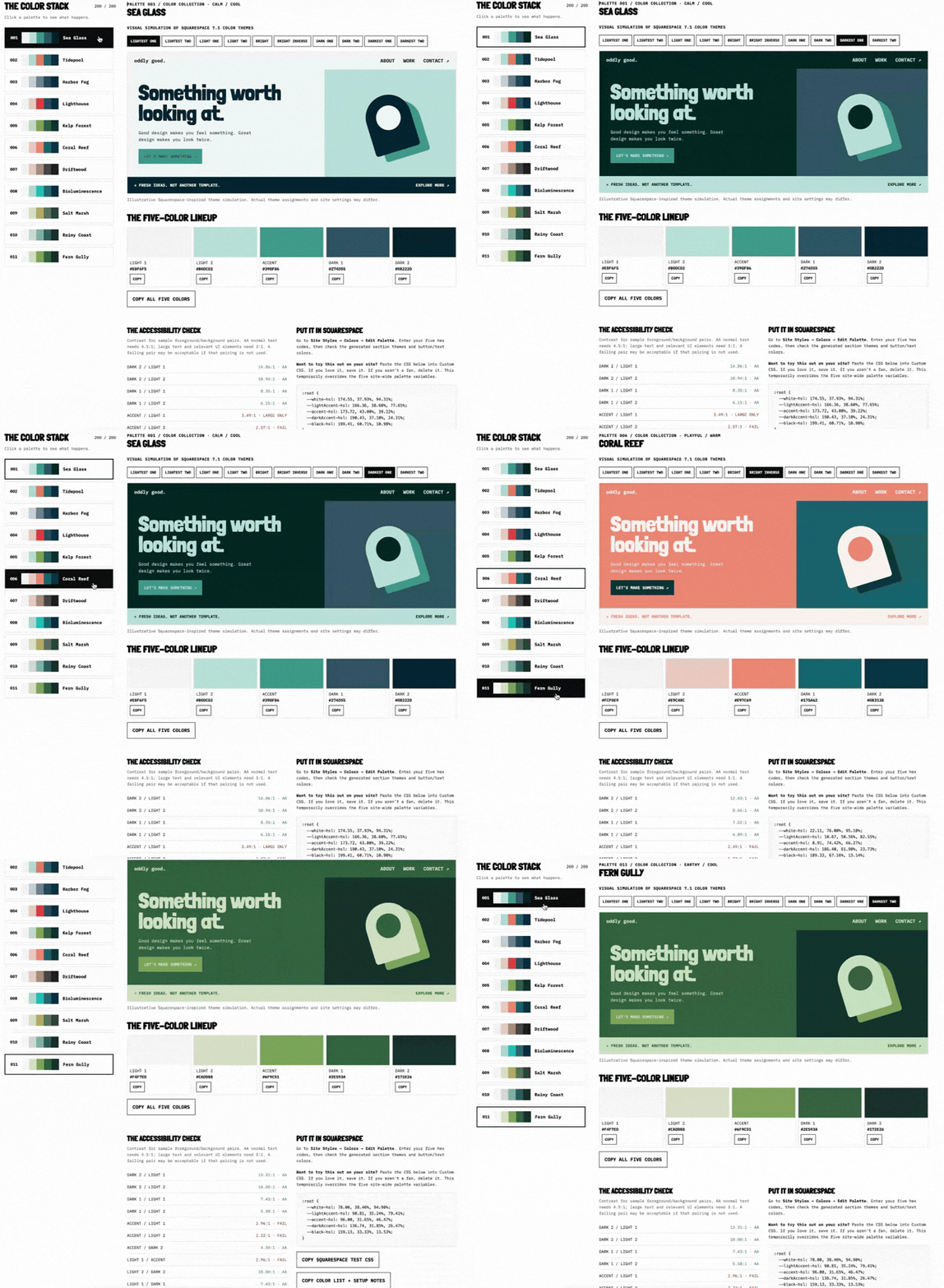
01 / FIND YOUR COLORS
Browse 200 palettes, search by name or hex code, and filter by vibe or temperature.
02 / SEE WHAT HAPPENS
Preview all ten Squarespace-inspired color themes and check contrast ratios before you commit.
03 / MAKE IT YOURS
Copy the five hex codes into Squarespace Site Styles. You can even grab the CSS to test the colors on your website.
BONUS / BREAK THE RULES
Already have colors in mind? Use the built-in color tool to create your own five-color combination, preview it, and check contrast.

A FEW QUICK QUESTIONS.
Why not just use a free color palette generator?
You absolutely can! But a pretty row of swatches doesn't tell you how those colors will behave on a website.
Chroma.db is built around Squarespace's actual five-color system, with theme previews, contrast checks, and ready-to-copy color codes. Less experimenting. More designing.
Do I need a subscription?
Nope! Pay $20 once, download the HTML file, and it's yours. Open it in your browser whenever inspiration strikes. No account, no monthly bill, no internet required.
Will these work with my Squarespace website?
Yep! Chroma.db was made specifically for Squarespace 7.1 and its five-color system. No trying to squeeze a random palette into a setup it wasn't designed for. Pick your colors, grab the hex codes, and get designing.
What if I already have brand colors I need to use?
Perfect. Bring 'em! The Build Your Own tool lets you plug in five hex codes, see how they work together across ten Squarespace-inspired color themes, and check contrast. Keep what works, change what doesn't.
Are all the palettes accessible?
We've done some of the homework, but you'll still need to check your work. Chroma.db includes contrast checks to help you spot combinations that meet WCAG guidelines. But accessibility depends on how you actually use the colors, so give your finished site a final check before calling it good.
Do I need to know anything about color theory?
Absolutely not. You don't need to understand complementary colors, color wheels, or whatever mysterious math makes a palette look good. That's kind of the point. Browse, preview, experiment, and trust your eyeballs. Chroma.db handles the technical checks.
YOUR NEXT FAVORITE PALETTE IS HERE.

200 color combinations.
Ten theme previews.
Click to copy test code.
YOURS FOR $20